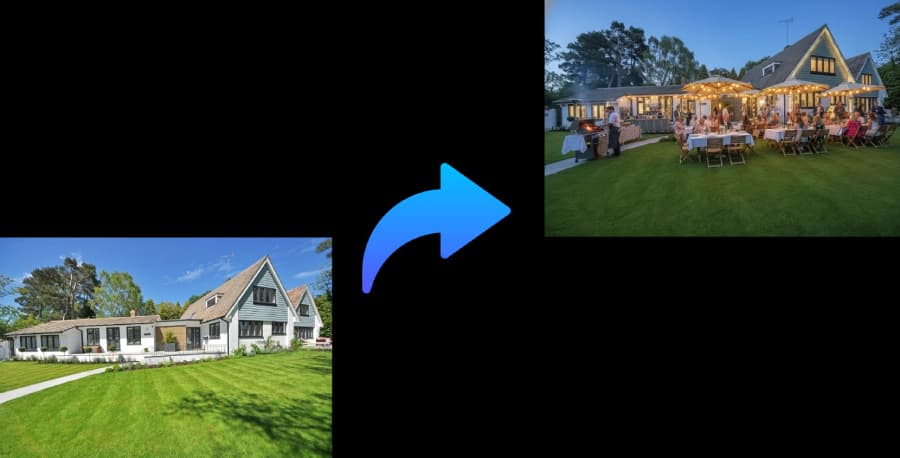
Describe the event and space. PartyPilotAI generates a practical checklist covering layout, supplies, rentals, decor, timing, and setup responsibilities.
party planning checklistparty planning checklist templateparty setup checklistparty planner checklist
Planning kit output
Layout zones, seating guidance, shopping priorities, and setup notes for real event execution.
DIY hosts
Know what to buy, rent, borrow, and assign before the day gets chaotic.
Family helpers
Give helpers clear tasks instead of sending vague inspiration boards.
Budget control
Separate must-have items from optional decor before buying.
What you get
Planning assets, not just inspiration.
Shopping checklist
Decor, tableware, lighting, signage, serving, trash, weather, and cleanup items.
Setup timeline
Prep, delivery, decorating, food setup, guest arrival, and cleanup windows.
Assignment notes
Tasks that can be handed to helpers, vendors, or family members.
Workflow
Use it before you commit budget.
The tool is designed for the messy stage where you know the party is happening, but the layout, table count, supplies, and setup responsibilities are still unclear.
1
Describe event type, guest count, budget, and space.
2
Add what you already own and what you need to avoid.
3
Generate a checklist, layout direction, and shopping priorities.
Planning coverage
Built around the planning details people search for.
People looking for a party planning checklist often need more than a printable list. They need a setup sequence, shopping priorities, rental decisions, helper assignments, and a way to connect the checklist to the actual room, yard, or venue where the party will happen.
A checklist based on your event
Generic party planning checklists are useful reminders, but they rarely know whether your event is a backyard birthday, baby shower, graduation, BBQ, dinner party, holiday party, or small reception. PartyPilotAI builds the checklist from your guest count, budget, food plan, space, theme, timing, and what you already own.
Turn the event brief into shopping, rental, decor, setup, food, cleanup, and weather tasks.
Separate must-have items from optional upgrades before you start buying.
Add constraints such as kids, elderly guests, parking, noise limits, pets, rain, heat, or no open flames.
Timeline and responsibilities
The most useful checklist tells you when to do the work and who can own it. The output can be used to brief family helpers, vendors, friends, or a coordinator so event day is not carried by memory alone.
Break planning into early prep, final shopping, delivery, decorating, food setup, guest arrival, and cleanup.
Identify tasks that can be delegated, such as ice pickup, trash setup, sign placement, playlist checks, or photo area setup.
Keep day-of instructions short enough for helpers to follow quickly.
Checklist plus layout direction
A supply list is easier to trust when it connects to a layout. If the plan includes a buffet, drink station, games, cake, gifts, photo area, or lounge seating, the checklist should include the specific items and setup notes those zones require.
Connect each shopping category to a real setup zone.
Include practical items hosts forget, such as trash bags, tape, extension cords, signage, serving utensils, and backup lighting.
Update the checklist when the floor plan, weather, or guest count changes.
Comparison
AI planning versus templates and manual notes.
Factor
PartyPilotAI
Static template
Manual plan
Personalization
Generated from your event type, space, guest count, budget, and constraints.
Same checklist for every host and venue.
Personalized only if the host has time to organize every category.
Day-of clarity
Combines supplies, timeline, layout notes, and assignments.
Often stops at reminders and broad categories.
Can be accurate but is easy to scatter across notes and chats.
Best use
DIY hosts who need a practical plan before shopping or delegating.
Simple parties with few moving parts.
Hosts who already have a complete planning system.
Checklist
Practical steps before the plan is final.
Use these checkpoints to prepare the brief, review the generated plan, and hand off clear tasks before event day.
1
Four to six weeks out: choose date, space, guest count, budget, theme direction, and food style.
2
Two to three weeks out: confirm rentals, helper roles, decor priorities, shopping list, and weather plan.
3
One week out: finalize floor plan, serving pieces, trash plan, playlist, signage, and delivery timing.
4
One day out: stage decor, tableware, extension cords, lights, coolers, labels, and cleaning supplies.
5
Event day: set zones first, then food, drinks, photos, gifts, activities, bathroom signs, and cleanup stations.
Common questions
Is this only a static checklist?
No. The checklist is generated from your event details, space, guest count, and budget.
Can it include shopping links?
The planning kit includes shopping categories and purchase direction. Direct links depend on the generated item type.
Can I use it for non-birthday events?
Yes. It works for showers, graduations, BBQs, holiday parties, dinners, and small receptions.