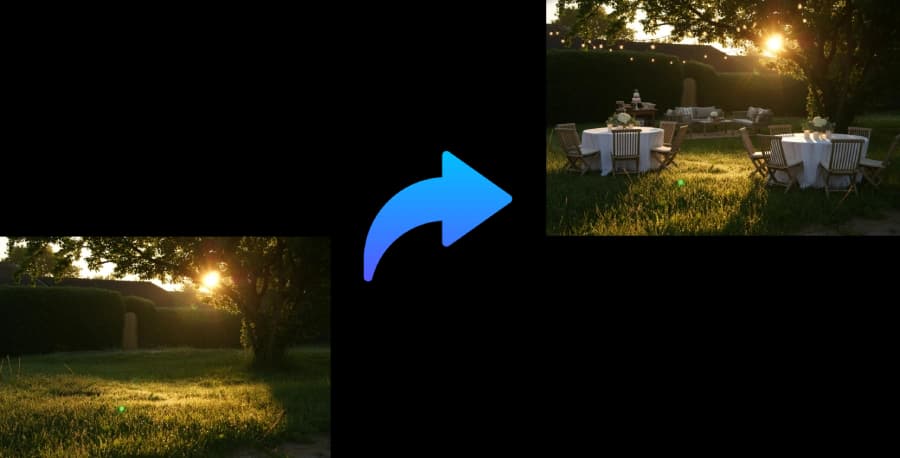
Create a practical event floor plan before you rent or buy.
Upload space photos or describe dimensions. PartyPilotAI turns the room, patio, yard, or rooftop into a usable layout with seating, food, decor, photo, and movement zones.
event floor plan creatorevent floor plan makerevent layout plannerevent floor plan software
Planning kit output
Layout zones, seating guidance, shopping priorities, and setup notes for real event execution.
Home parties
Backyards, living rooms, rooftops, garages, patios, and mixed indoor-outdoor spaces.
Small venues
Community rooms, clubhouses, small halls, and private dining rooms.
Vendor handoff
Give decorators, rental vendors, and family helpers a clearer setup direction.
What you get
Planning assets, not just inspiration.
Zone layout
Dining, food, drinks, gift, photo, lounge, activity, and walkway areas.
Setup notes
Practical guidance for table placement, traffic flow, lighting, and weather constraints.
Shopping list
Decor, rentals, lighting, tableware, and setup items with quantity guidance.
Workflow
Use it before you commit budget.
The tool is designed for the messy stage where you know the party is happening, but the layout, table count, supplies, and setup responsibilities are still unclear.
1
Upload photos or describe the event space.
2
Add guest count, table style, budget, and required zones.
3
Generate a layout, setup notes, shopping list, and optional visual mockup.
Planning coverage
Built around the planning details people search for.
People searching for an event floor plan creator usually need a practical layout before they reserve rentals, assign helpers, or send setup notes to a venue. This page focuses on quick AI-assisted planning for home parties, small venues, patios, yards, rooftops, showers, graduations, and casual receptions where the layout must match a real space.
Space-first layout planning
A useful event floor plan starts with the constraints that guests will actually feel: doors, walkways, serving bottlenecks, shade, outlets, bathrooms, stairs, no-go areas, and the distance between food, seating, and activities. PartyPilotAI uses uploaded photos or written dimensions to turn those constraints into zones instead of asking you to start from a blank canvas.
Keep walkways clear between entries, buffet tables, bars, restrooms, and exits.
Flag practical details such as lighting, trash, extension cords, tent placement, and rain backup.
Rental and vendor decisions
The plan is designed to help you decide what to rent, buy, borrow, or remove. Instead of guessing table counts from a generic template, the output connects table style, guest count, food service, decor, and helper responsibilities to the space you are using.
Estimate where folding tables, cocktail tables, lounge seating, bars, and serving stations belong.
Separate must-have rentals from nice-to-have decor so the budget stays focused.
Create setup notes that decorators, rental vendors, coordinators, or family helpers can follow.
Indoor and outdoor coverage
The same planning flow works for a living room, backyard, clubhouse, private dining room, community hall, rooftop, garage, patio, or mixed indoor-outdoor setup. Outdoor plans include shade, wind, heat, rain, grill safety, uneven ground, and lighting considerations.
Handle backyard parties, baby showers, BBQs, birthdays, graduations, and small wedding receptions.
Add known measurements when available, or start with photos and written notes for a first draft.
Generate a plan early, then regenerate when RSVPs, rentals, or venue rules change.
Comparison
AI planning versus templates and manual notes.
Factor
PartyPilotAI
Static template
Manual plan
Starting point
Uses your photos, guest count, event type, and constraints.
Starts from a generic room or table diagram.
Starts from hand notes, screenshots, or a blank document.